Managing social media looks simple from the outside. A few posts, some comments, maybe a report at the end of the month. In reality, it’s one of the most time-consuming parts of modern digital marketing. Between content creation, posting, engagement, analytics, approvals, and lead follow-ups, businesses quietly lose 10 or more hours every week on repetitive social media tasks.
In 2026, that time drain is no longer necessary. Social media automation has evolved beyond basic scheduling. Today, businesses use automation to simplify entire workflows, reduce manual effort, and operate consistently without burning out their teams. The result is not just saved time but also better focus, faster growth, and more predictable performance.
Looking for a leading social media automation software company you can scale with? Hashtech delivers enterprise-grade automation that connects content scheduling, analytics, and lead workflows into one system, built for modern businesses that value efficiency and performance.
What Social Media Automation Really Means for Businesses in 2026
In 2026, social media automation goes beyond pre-planned posts. Modern social media automation software connects multiple tools, platforms, and actions into a single workflow. Instead of managing tasks one by one, automation systems execute them automatically using rules, triggers, and schedules.
For example, businesses can schedule a single piece of content, repurpose it across platforms, track engagement, and add it to performance reports, all without manual effort. Automation also enables AI-assisted captions, hashtag suggestions, lead tagging, and reporting, making it far more powerful than earlier tools.
Many people believe automation removes the human element, but in reality, it eliminates repetitive work, not strategy or creativity. Businesses that automate intelligently appear more consistent and respond faster because their systems handle the heavy lifting in the background.
Where Most Businesses Lose 10+ Hours Every Week
The biggest time loss in social media management doesn’t come from strategy, it comes from repetition. Many teams still post manually across platforms, copy-pasting captions, uploading visuals one by one, and checking notifications separately for each account.
Another major drain is engagement management. Replying to comments, monitoring messages, and tracking mentions across platforms quickly adds up, especially for brands with active audiences. Reporting is another silent time killer. Collecting metrics, exporting data, and building reports manually can take hours every month.
Approval workflows also slow teams down. Content goes back and forth between tools, emails, and chats, often creating bottlenecks. When all these tasks are added together, it becomes clear why social media feels overwhelming even for small businesses.
The time savings from social media automation don’t come from one large task. They come from removing dozens of small, repetitive actions.
For most businesses, the weekly breakdown looks like this:
Posting and scheduling: 3–4 hours saved by batching content and publishing across platforms from one dashboard
Engagement monitoring: 2–3 hours saved by centralized inboxes and automated tagging or filtering
Reporting and analytics: 2–4 hours saved through automated dashboards and scheduled reports
Content recycling and optimization: 1–2 hours saved by automatically reusing high-performing posts
Individually, these tasks feel minor. Combined, they easily exceed 10 hours per week. Over a month, that time compounds into full workdays reclaimed.
Tired of building social media reports manually every week? Hashtech offers one of the best tools for automating social media reports, providing real-time dashboards and scheduled performance summaries that eliminate manual data collection and save hours every month.
Manual Posting vs. Automated Posting
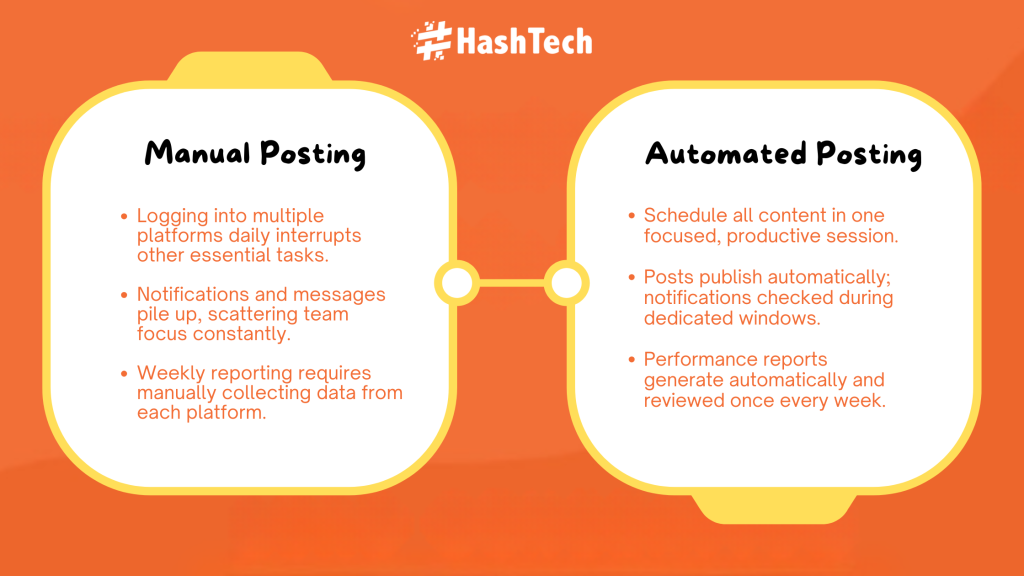
Before automation, social media work is scattered across the week. A typical day starts with logging into multiple platforms to post manually. Notifications interrupt other tasks. Messages pile up. Reporting is postponed until the end of the week, when data has to be pulled manually from each platform.
Nothing feels overwhelming on its own, but the constant context switching quietly consumes hours.
After automation, the workflow changes completely. Content is planned and scheduled in a single focused session. Posts go live automatically across platforms without daily intervention. Notifications are reviewed during a dedicated engagement window. Performance reports are generated automatically and reviewed once a week.
Instead of social media controlling the schedule, it fits neatly into it. The same work gets done, but in fewer, more intentional sessions.
This shift is where the real time savings come from, not from doing less, but from doing it all at once.
What Can Be Automated (And What Should Not Be)
Not every social media task should be automated, and that distinction matters. Posting, scheduling, reporting, hashtag research, content recycling, and basic lead tagging are ideal candidates for automation. These are predictable, repeatable, and rule-based.
What should not be fully automated is brand voice, sensitive customer conversations, and strategic decision-making. Automation should support humans, not replace them. The most effective systems combine automated execution with human oversight, ensuring authenticity remains intact.
Understanding which social media tasks are skipped by automation tools and which ones require manual inputhelps prevent over-automation and keeps engagement genuine.
How to Start Automating Without Overcomplicating Things
Automation doesn’t need to be immediate or total.
A gradual approach works best:
Start with one platform
Plan one week of content in advance
Batch content creation into a single session
Adjust based on performance and comfort
Each step builds confidence and reduces resistance. Over time, automation becomes part of the workflow rather than a separate task.
Tools That Make Social Media Automation Work
Modern automation relies on combining multiple platforms rather than using a single tool. Social media automation tools manage scheduling and publishing, while workflow automation platforms connect social channels with CRMs, email tools, and analytics systems.
AI-powered tools support teams by generating captions, suggesting hashtags, and optimizing content. Reporting platforms handle social media automated reporting through real-time dashboards and scheduled summaries. When businesses integrate these tools correctly, they create a seamless system that runs efficiently in the background.
Businesses choose tools based on size, goals, and industry, but the objective stays the same: reduce manual effort without sacrificing quality.
Which Businesses Benefit Most From Social Media Automation
While automation can help almost any organization, it’s especially valuable for businesses with limited time and growing visibility needs.
It’s particularly effective for:
Small teams managing multiple roles
Service-based businesses balancing delivery and marketing
Founders overseeing both strategy and execution
Brands increasing content frequency without expanding staff
Automation creates consistency without requiring constant attention, which is often the biggest challenge for growing businesses.
Common Automation Mistakes That Reduce Impact
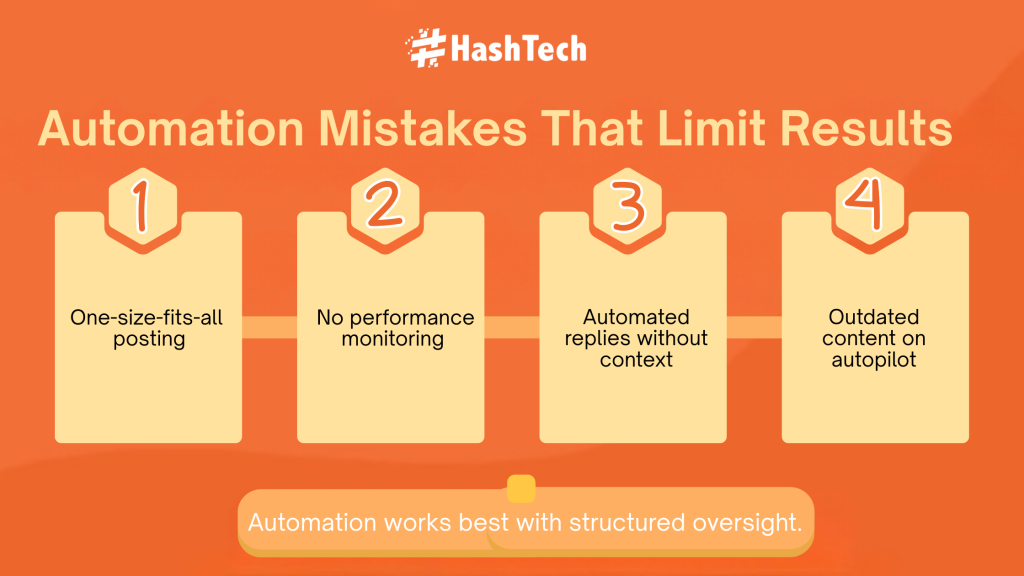
Automation can backfire when it’s treated as a shortcut rather than a system.
Common issues include:
Posting identical content across every platform
Ignoring analytics and feedback
Automating responses that require human judgment
Leaving outdated content scheduled indefinitely
Successful automation still involves oversight. The difference is that oversight happens in planned sessions, not constant check-ins.
How to Set Up a Simple Automation System in One Week
A practical automation setup doesn’t require months. In the first phase, businesses should focus on scheduling and content batching. This alone delivers immediate time savings. Next, connect analytics and reporting tools to automate performance tracking.
The final step is workflow optimization, such as automating lead tagging or notifications. By the end of the first week, most businesses already see noticeable reductions in manual work. Over time, additional layers can be added as needs grow.
Measuring the Impact: Time Saved vs Results Gained
One of the biggest concerns around automation is losing authenticity. This typically happens when automation is used without intention.
Authenticity is preserved by:
Writing in a natural, conversational tone
Reviewing scheduled content regularly
Responding to comments manually
Updating content as priorities change
Automation should never replace interaction. It should create space for it. By removing repetitive posting tasks, more time becomes available for meaningful engagement.
The success of social media automation should be measured in both time saved and results gained. Track how many hours are reclaimed each week and compare engagement quality before and after automation.
Most businesses find that consistency improves alongside efficiency. When systems handle execution, teams can focus on strategy, creativity, and relationship-building. The ROI of automation goes beyond numbers; it changes how teams work.
Real estate social media doesn’t need to be manual. Be it like we automated real estate social media for top-performing brokerages, we can help your team too. Contact us today.
FAQs
What is social media automation?
Social media automation is the use of software to schedule posts, manage workflows, track engagement, and generate reports automatically, reducing manual effort while maintaining consistent online presence.
How many hours can social media automation save per week?
Most businesses save between 8 to 15 hours per week by automating posting, reporting, and engagement workflows, depending on content volume and team size.
Does social media automation hurt engagement?
No, when used correctly. Automation improves consistency and response speed. Engagement only drops when brands over-automate without monitoring or personalization.
Which social media tasks should be automated first?
Posting, scheduling, reporting, content recycling, and basic analytics are the best tasks to automate first because they are repetitive and time-intensive.
Is social media automation suitable for small businesses?
Yes. Small businesses benefit the most because automation allows them to compete with larger brands without hiring additional staff.
How to automate lead generation for social media marketing agencies?
Agencies can automate lead generation by connecting social platforms to CRMs, triggering workflows from form submissions, automatically tagging leads, and tracking engagement. As an experienced social media automation agency, Hashtech implements these systems efficiently, helping businesses capture and manage leads without extra manual work.